
Bancroft Middle School Attendance Policy
All absences MUST be cleared within 24 hours or they become a ‘CUT.’ At the end of each attendance month, all attendance becomes permanent and CANNOT be changed.
Detailed Instructions:
-
Reply to Absence Notification: If you receive an absence notification from ParentSquare, you can reply directly to that message with a note.
-
Create a New Message:
-
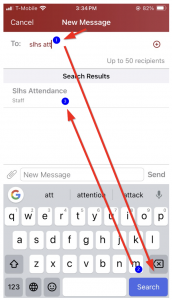
Mobile App: Open the ParentSquare app, go to “Messages,” and click the “+” button to start a new message.
-
-
-
Web Portal: Log in to ParentSquare, click “Messages,” and then click “New Message” .
-
Address the Message: Send the message to the school’s attendance office “Slhsattendance”.
-
Include the Reason for Absence: Clearly state the reason for the absence in your message.
-
Submit the Message: Click “Send” to send the excuse to the school.
Permit to Leave School
When your student needs to be excused for a dentist appointment, doctor appointment, or any other reason, they should bring a note from their parent/guardian to the office before school in the morning. The student will be given a Permit to Leave to show his/her teacher. Students must come to the office to sign out at the scheduled time before leaving the campus and return to the office to sign in upon their return.
It is very difficult to ensure that students will be waiting in the office or outside if a note is not sent with the student to school.
Parents: Please arrange with your students where they are to meet you after they sign out in the office


