


All families will receive messages, texts, or phone calls from ParentSquare when students are Tardy or Absent. Morning absences or tardies are sent at 12:00 pm, and afternoon notices are sent at 5:00 pm.
To excuse an absence on ParentSquare, caregivers can “reply” directly to an absence notification or navigate to the “Messages” section and create a new message to the school, and include the reason for the absence. The attendance office will receive the note immediately after it is submitted.
Detailed Instructions:
Reply to Absence Notification: If you receive an absence notification from ParentSquare, you can reply directly to that message with a note.
Create a New Message:
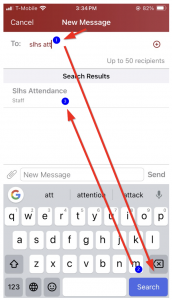
Mobile App: Open the ParentSquare app, go to “Messages,” and click the “+” button to start a new message.
Web Portal: Log in to ParentSquare, click “Messages,” and then click “New Message” .
Address the Message: Send the message to the school’s attendance office “Slhsattendance”.
Include the Reason for Absence: Clearly state the reason for the absence in your message.
Submit the Message: Click “Send” to send the excuse to the school.
